 Passboards.
Guide · Choosing an app
Shared photo album apps, honestly compared
By Max Khan, founder of Passboards · Updated · Facts last checked
We make Passboards, one of the apps on this page, so take this with that in mind. We’ve tried to be fair: for plenty of groups, another option here is the better choice, and we say so.
The right app depends on three things more than on features: what phones your group uses, whether everyone will install something, and whether you want a pile of photos or a place that keeps the story. Here’s how the main options compare.
The short version
- Mixed iPhone and Android group, nobody wants a new app: Google Photos shared albums.
- All on Apple devices, photos only, or someone without an Apple Account needs to add photos: Apple’s Shared Albums (much improved in iOS 27).
- A wedding or big event where every guest should upload from any phone: a QR-code upload service.
- A small group of iPhone friends who want the trip, night or club kept together, with who was there, captions, notes and music: Passboards.
- Just sending a few photos tonight: your group chat is fine.
At a glance
| iCloud Shared Albums (iOS 27) | Google Photos shared albums | Group chat (WhatsApp, iMessage…) | Wedding QR upload apps | Passboards | |
|---|---|---|---|---|---|
| Phones | Apple devices; web joining and contributing without an Apple Account (Apple) | iPhone, Android, web | Any, per app | Any phone browser | iPhone, iOS 26+ (also on the web with an account) |
| Needs an install / account to add | No, on the web (iOS 27) | With link sharing on, people with the link can view and add (Google); check whether a Google Account is needed | The chat app | Usually no app, no sign-up (Honcho) | Yes: an account (18+), made in the iPhone app |
| People | 100 participants (Apple) | Not stated on Google’s help page | Per app | Per plan | 100 members per board |
| Capacity | 5,000 photos and videos per album (Apple) | Not stated on Google’s help page | Chat history | Often unlimited on paid plans; some cap at 100–1,000 (Honcho) | 250 posts per board, 15 photos/videos each |
| Quality | Full-resolution sharing from iOS 27 (Apple); iOS 26 and earlier: photos 2,048 px long edge, video 720p (Apple) | Your backup quality | Often compressed by default | Varies | Photos sharp at full-screen size, video 720p |
| Beyond photos | Comments, emoji reactions (iOS 27) | Comments, likes | Everything else you talk about | Photo walls, guestbooks (varies) | Captions, notes and essays, music posts, clubs with chat, events and announcements |
| Location in files | Check sharing options | Check sharing settings | Varies by app | Varies | Removed before upload |
| Export | Save items to your library | Download / Takeout | Save individually | Download (check plan) | Whole board to Photos, or zip with captions, dates and names, free |
| Cost | Free | Free (check Google’s storage terms) | Free | Mostly one-off $39–$49; some free tiers (Honcho) | Free, no ads today |
iCloud Shared Albums
Built into every iPhone, iPad and Mac. In iOS 27, Apple added full-resolution sharing, filters and sorting, emoji reactions and new ways to invite people, and friends “will be able to join and contribute their own photos on the web, even without an Apple Account or Apple device”. Owners can choose to approve people or let anyone with the link join, and an album can be set to delete itself within 30 days (Apple).
- Better than Passboards at: reaching people with no app and no account; full-resolution sharing; being already on every iPhone; 5,000 items per album against our 250 posts.
- Less suited to: keeping who took what, captions and the story of an occasion, and ongoing groups that also want a chat, events and a home.
- Pick it if: your group is mostly on Apple devices and you want photos in one place with the least setup.
Google Photos shared albums
The default for mixed iPhone and Android groups. Share an album by link and “viewers can add their own photos, videos, and comments” (Google), with a Collaborate setting to turn that off.
- Better than Passboards at: Android support, the web, search across your whole library, and capacity.
- Less suited to: privacy-minded groups who don’t want a link that anyone can open, and groups who want an album that reads like an occasion rather than a stream of files.
- Pick it if: your group mixes phones and already uses Google Photos.
Group chats (WhatsApp, iMessage, Messenger)
Where most photos from a night out go first, and for the evening itself they’re great. The problems appear later: media is often sent at reduced quality unless someone chooses a higher-quality option, the photos are buried under everything else the group talks about, and a year on nobody scrolls back to find them.
- Better than Passboards at: being where your friends already are, on every phone, instantly.
- Less suited to: keeping anything. Treat the chat as the conversation and something else as the album.
Wedding and event QR upload apps
Services such as Guestlense, Wedibox, POV, Kululu and others give you a QR code; guests scan it, a web page opens and they upload. Most need no app and no sign-up, and typical pricing is a one-off $39–$49 per event, with cheaper tiers that cap photos or guests. Some free options exist, such as WedShoots (app required) and Joy (1,000 photos) (Honcho, 2026; Guestlense).
- Better than Passboards at: getting uploads from a big, mixed room of guests who won’t install anything, and live photo walls at the reception.
- Less suited to: a place people return to afterwards, or anything beyond the one event.
- Pick it if: it’s a large wedding or event and maximum participation matters most.
Using Passboards for a wedding? See wedding photo sharing.
See our wedding guide.
Passboards
Passboards is a shared home for a group on iPhone. Each trip, concert, wedding or dinner gets a board that everyone who was there adds to, and groups who keep making plans get a club with a chat, events, announcements and their own passboards.com/c/ address. See how it works.
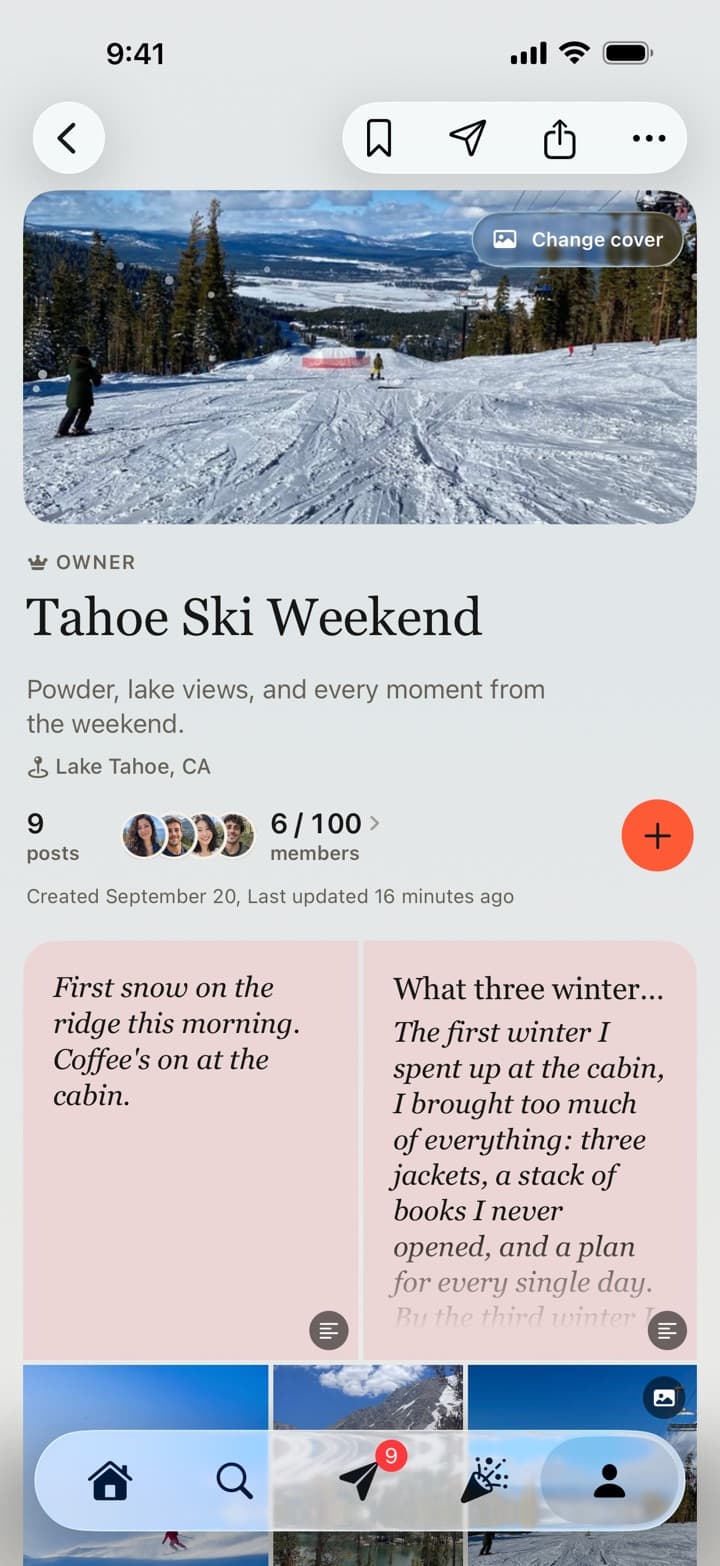
What it’s built for:
- The whole story, not just files. Posts keep who shared them, captions and the friends in them. Add notes and long-form essays, and the song of the weekend from Apple Music or Spotify.
- Privacy by default. Private boards are seen only by members. Location and device details are removed from photo files before they upload. No ads today. More in our privacy policy.
- Getting people in. Invite with a link or printable QR code; people who tap it before they have the app sign up and land on the board. Choose Contributors, who add photos without managing the board, or viewers. Set an expiry or a limit, or turn the link off.
- Getting photos in. Uploads keep going in the background, you can share straight from Photos to a board, and dated boards send a gentle start, a last call for photos and a note when the album is complete, never in quiet hours.
- Keeping it. Save the whole board to Photos, or export it with every caption, date and name, free. Turn a board into a short recap video with an original soundtrack.
Where others are better, plainly:
- No Android app. Accounts are made in the iPhone app (iOS 26 or later), so everyone who adds photos needs an iPhone to sign up.
- Everyone needs an account (18+), made in the iPhone app. There’s no upload page for people without one. With an account, photos can also be added from a browser at passboards.com/app.
- Smaller capacity: 100 members and 250 posts per board.
- Not a full-resolution archive: photos are kept sharp at full-screen size, video at 720p. Keep your originals.
- It’s small and new. Passboards is built by one person. We think that’s a strength (it’s built carefully, for small groups, with no ads today), but you should know it. We commit to free export and at least 90 days’ notice, in the app and by email, before any shutdown.
Pick it if: your group is on iPhone and you want each occasion kept together, as a story, in a private place you’ll come back to.
How to choose, in four questions
- Is anyone on Android? If yes, Google Photos or a web-based option.
- Will everyone install an app? If not, Apple’s web contributions (iOS 27), Google Photos or a QR service.
- Is this one event or an ongoing group? One event: any album works. A group that meets again and again: something with a home, like a club.
- Do you want a pile or a story? Piles are fine for backups. Stories need captions, who was there and a sense of order.
Free for iPhone on iOS 26 or later. No ads today.
Common questions
What people ask.
What is the best shared photo album app?
It depends on your group. Google Photos suits mixed iPhone and Android groups; Apple’s Shared Albums suit Apple users and, from iOS 27, let people add photos on the web without an Apple Account; QR upload services suit large events; Passboards suits iPhone groups who want each occasion kept together as a story.
Can Android users add to an iCloud Shared Album?
From iOS 27, Apple says people can join and contribute on the web even without an Apple Account or Apple device.
Does Passboards work on Android?
No. Passboards is an iPhone app for iOS 26 or later, and accounts are made in it. People with an account can also use Passboards on the web at passboards.com/app, including adding photos. Videos are added from the iPhone app.
Which shared album keeps full-resolution photos?
Apple’s Shared Albums support full-resolution sharing from iOS 27. Passboards keeps photos sharp at full-screen size and video at 720p; it isn’t a full-resolution backup.
Is Passboards free?
Yes. It’s free on the App Store, with no ads today.
How many people can join a shared album?
Apple’s Shared Albums allow 100 participants. A Passboards board holds up to 100 members.
Why not just use the group chat?
Chats are great for the moment, but photos get buried and are often compressed. A shared album keeps them together and easy to find later.